
Wondering whether a loan app is real or fake? No single sign settles it. A few short checks, though, can tell you a lot before you hand over your documents. This guide gives you a method. It does not rule on any named app, and it is general information, not legal or financial advice.
First, a quick word on who is who. The app you download may be run by a Lending Service Provider (LSP), a company that helps a lender find and serve borrowers. The money itself comes from a lender regulated by the Reserve Bank of India (RBI), such as a bank or a non-banking financial company (NBFC) (RBI NBFC Credit Facilities Directions, Chapter III (opens in a new tab)).
Here are the five checks:
- Find out who the lender is.
- Look the lender up on RBI's lists.
- Ask for the Key Fact Statement before you sign.
- Read the permission screen and the money trail.
- Know where to report, and where to complain.
Check 1: Find out who the lender is
How do you identify a fake loan app? Start with one question: who is lending me the money?
An app is often not the lender. When an LSP works with several lenders, RBI rules say each loan offer must show the name of the lender making it. This applies from 1 November 2025 to LSPs that work with more than one lender, so not every app will look the same (RBI NBFC Credit Facilities Directions, Chapter III (opens in a new tab)).
Lenders must also list the LSPs and apps they work with on their own website. So once you have the lender's name, you can visit the lender's site and see if the app appears there.
This is not a new idea. Back in December 2020, RBI advised that digital lending platforms should disclose the name of the lender upfront (RBI press release, 23 December 2020 (opens in a new tab)). No lender name anywhere? Stop there.
Check 2: Look the lender up on RBI's lists
Many people search for an "RBI registered loan company list". In practice, RBI publishes two different things, and they answer different questions.
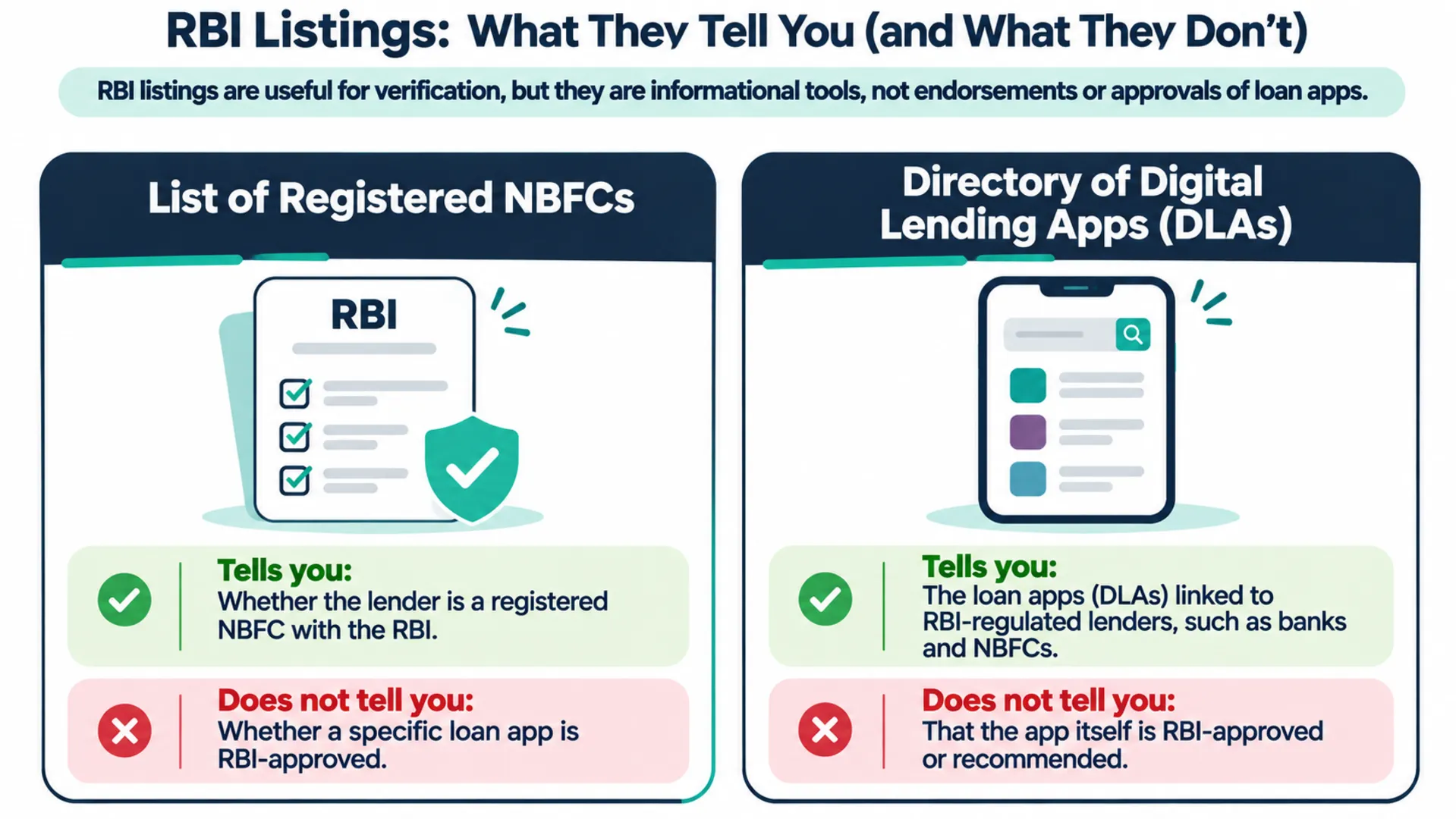
| RBI list | What it tells you | What it does not tell you |
|---|---|---|
| RBI's list of registered NBFCs | The company holds a certificate of registration from RBI as an NBFC | It does not endorse any app, loan offer or set of terms |
| RBI's directory of digital lending apps | A regulated lender has reported this app as linked to it | RBI does not validate the data, and a listing is not RBI approval |
RBI's list of registered NBFCs
An NBFC is a company that lends money but is not a bank. RBI keeps a list of registered NBFCs on its website (opens in a new tab). In its 2020 advice, RBI suggested that people check a lender against this list (RBI press release, 23 December 2020 (opens in a new tab)).
For anyone asking how to check an NBFC is registered with RBI, this list is the place to look. Keep in mind what a listing means. It shows the company holds a certificate of registration. It is not a seal of approval for any app or for the terms on offer. Banks are lenders too, and they will not appear on an NBFC list.
RBI's directory of digital lending apps, and what a listing means
RBI also publishes a public directory of digital lending apps (DLAs). In May 2025, RBI said this directory would sit under the Citizen's Corner section of its website. It is built from what lenders report to RBI and was due to go live by 1 July 2025 (RBI press release on the Digital Lending Directions (opens in a new tab)).
Here is the important part. The lenders report this data themselves, and RBI does not validate it. Lenders must not present a listing as RBI registration, authorisation or approval (RBI NBFC Credit Facilities Directions, Chapter III (opens in a new tab)). In our view, a listing also says nothing about whether the terms are fair. That is what the next check is for.
A note on dates: these rules first came in the Digital Lending Directions issued on 8 May 2025 (RBI Digital Lending Directions, 2025 (opens in a new tab)). That document is now on RBI's list of withdrawn circulars. For NBFCs, the rules now sit in Chapter III of RBI's Credit Facilities Directions.
Check 3: Ask for the Key Fact Statement before you sign
The Key Fact Statement (KFS) is a short document that sets out the main terms of your loan in one place. RBI rules say a lender must give you the KFS before you sign the loan contract (RBI NBFC Responsible Business Conduct Directions, para 29 (opens in a new tab)).
What the KFS should include:
- A standard format, in a language you understand.
- The Annual Percentage Rate (APR), which is the total yearly cost of the loan, including interest and charges.
- An APR calculation sheet and a repayment schedule, which shows each instalment.
- Contact details of the lender's grievance officer.
Any charge that is not in the KFS cannot be added later without your explicit consent. The rule covers retail and MSME term loans from 1 October 2024, when it first came in through an April 2024 RBI circular. Credit cards are not covered.
You also get time to think. The KFS must stay valid for at least three working days for loans of seven days or more. For shorter loans, it must stay valid for at least one working day (RBI NBFC Responsible Business Conduct Directions, para 29(2) (opens in a new tab)).
Digital loans also come with a cooling-off period. This is a window, set by the lender and at least one day long, when you can exit the loan. You do this by repaying the principal and the proportionate APR, with no penalty. The lender may keep a one-time processing fee if it was disclosed to you (RBI NBFC Credit Facilities Directions, Chapter III (opens in a new tab)).
If an app will not show you a KFS before you sign, pause. Ask for it. A missing KFS is a reason to wait.
Check 4: Read the permission screen and the money trail
The permission screen often tells you more than the ads do. RBI rules for regulated lenders' apps say they may collect data only as needed, and only with your explicit consent. These apps must not access your files and media, contacts, call logs or telephony functions. One-time access to your camera, microphone and location is allowed for KYC (RBI NBFC Credit Facilities Directions, Chapter III (opens in a new tab)). You can deny or withdraw consent, and you can ask for your data to be deleted.
So if a loan app asks for your contacts or your photo gallery, treat it as a warning sign. It does not prove the app is a fake loan app, but it is a strong reason to stop and check further.
Next, follow the money. Under the same rules, the loan amount should go into your own bank account, not to an LSP or a third party's account. A few listed exceptions exist, such as some co-lending cases. Your repayments should also go directly to the lender.
What about fees? Any fee a lender charges must be shown in the KFS. As general guidance, be wary of anyone who asks you to pay money into a personal account to "release" a loan.
RBI's 2020 advice made a similar point. It told people to verify a lender's background and never to share KYC documents with unverified apps (RBI press release, 23 December 2020 (opens in a new tab)).
Check 5: Know where to report, and where to complain
Where you go depends on what has happened. The routes below are general guidance, not legal advice. Reporting also does not replace telling your bank.
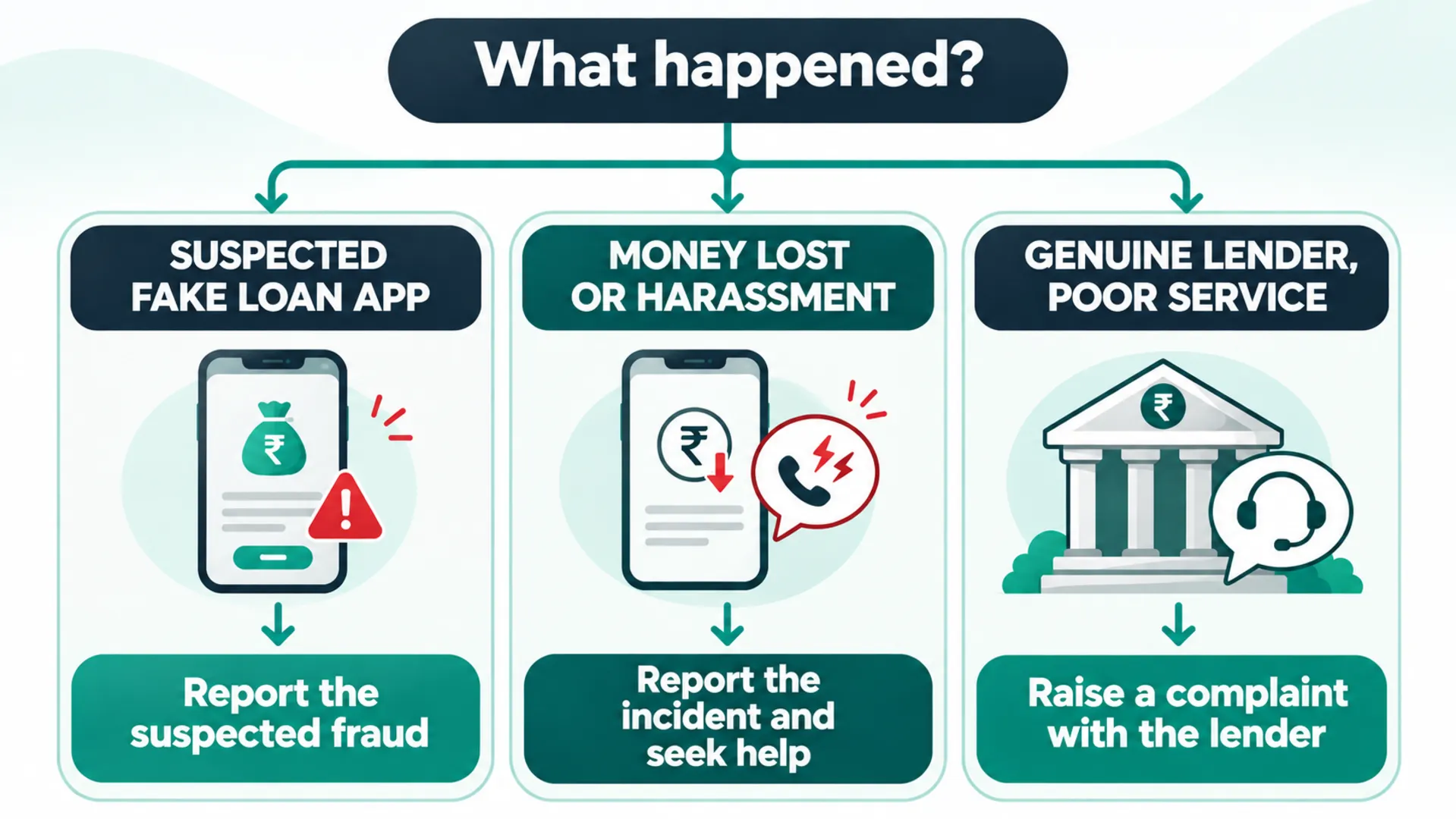
| What happened | Where to go |
|---|---|
| You suspect a fake or unregistered lending app | RBI's Sachet portal, and law enforcement |
| You lost money, or face harassment or data misuse | The 1930 helpline and cybercrime.gov.in |
| A genuine lender treated you badly | The lender's grievance officer, then the RBI Ombudsman if your lender is covered |
A suspected fake or unregistered app
On how to report a fake loan app, RBI's 2020 advice is a good starting point. It pointed people to RBI's Sachet portal for complaints about unregistered or unregulated entities that lend money or take deposits. RBI also advised reporting suspicious apps to law enforcement (RBI press release, 23 December 2020 (opens in a new tab)).
Money lost, harassment or misuse of your data
For a loan app harassment complaint or online financial fraud, there is a national helpline, 1930, and the National Cyber Crime Reporting Portal at cybercrime.gov.in. Bank guidance suggests calling 1930 first, noting your acknowledgement number, and then filing on the portal. The portal is also the place to report harassment. Tell your bank as well.
A genuine lender that treats you badly
Sometimes the lender is real but the service is poor. Start with the lender's grievance officer. Their contact details must appear on the lender's website, its app and the KFS (RBI NBFC Credit Facilities Directions, Chapter III (opens in a new tab)).
If the lender does not reply within 30 days, or you are not happy with the reply, you can go to the RBI Ombudsman under the RBI Integrated Ombudsman Scheme, 2026. You can file at cms.rbi.org.in, by email at crpc@rbi.org.in, or by post. RBI also has a toll-free number, 14448. You should file within 90 days of the lender's reply, or of the 30-day period ending, whichever is later (RB-IOS 2026 FAQs (opens in a new tab)).
One limit matters here. The Ombudsman scheme does not cover every lender, and smaller NBFCs may fall outside it. RBI says NBFCs are covered if they take deposits, or if they deal with customers and have assets of ₹100 crore or more.
Before you borrow from any app: affordability, stacking and missed payments
A real app is not the same as a right loan for you. Before you borrow, check that the EMI (your monthly instalment) fits your budget.
Say you earn ₹30,000 a month and an app offers a loan with an EMI of ₹6,000. That is one-fifth of your income, every month, for the whole loan. Ask yourself whether you can still pay rent, food and bills after that.
Loan stacking means taking several loans at the same time, often from different apps. Each EMI may look small, but together they can take more of your income than you planned. Missed payments can add charges and make future borrowing harder. Remember too that the lender decides whether to approve a loan, based on its own eligibility checks.
Where Rinncrest fits, and a calm next step
We think you should know who is writing this. Rinncrest is a Lending Service Provider, not a lender. Loans through the Rinn app are offered by our RBI-regulated lending partner, subject to eligibility checks. The Rinn app is launching in November 2026.
Every check in this guide applies to us too. Read our safety page (opens in a new tab) to see how. To hear when Rinn opens, join the waitlist on rinncrest.in (opens in a new tab). There is no need to decide anything today.
Frequently asked questions
If an app is in RBI's directory, is it RBI approved?
No. Lenders report their apps to the directory, RBI does not validate the data, and lenders must not present a listing as RBI approval. See Check 2 above.
Can I change my mind after a digital loan is disbursed?
Usually, yes, within the cooling-off period. Ask the lender how long its period is, since it is set by the lender and is at least one day.
What if I have already shared my documents or permissions?
Stay calm and act step by step. Go to your phone's settings and remove the app's permissions. If the app is from a regulated lender, you can ask it to delete your data. If you have lost money or face harassment, call 1930 and file on cybercrime.gov.in, and tell your bank.
Is this loan app safe?
No article can promise that. What you can do is run the method: find the lender, check RBI's lists, read the KFS, and look hard at the permissions.
Conclusion
No single list, logo or screen proves a loan app is real or fake. An NBFC registration is not an endorsement of an app. A directory listing is reported by the lender and not validated by RBI. The real protection is the habit: know the lender, check RBI's lists, read the KFS before you sign, refuse needless permissions, and know where to report.
Those five checks take a few minutes and can save you months of trouble. If you want to see them applied to us, read our safety page (opens in a new tab). So before you share your next document, can you say who your lender is and where you would find them on RBI's list?
Sources
- RBI NBFC Credit Facilities Directions, 2025, Chapter III (digital lending) (opens in a new tab)
- RBI NBFC Responsible Business Conduct Directions, 2025, para 29 (Key Fact Statement) (opens in a new tab)
- RBI list of registered NBFCs (opens in a new tab)
- RBI press release on the Digital Lending Directions and the DLA directory (opens in a new tab)
- RBI Digital Lending Directions, 2025 (issued 8 May 2025, now withdrawn) (opens in a new tab)
- RBI press release, 23 December 2020, on unauthorised digital lending apps (opens in a new tab)
- RBI Integrated Ombudsman Scheme, 2026, FAQs (opens in a new tab)